it would’ve scared the fuck out of me holy shit that’s big
So for anybody who doesn’t know, that ring of bubbles you see coming up before the humpback does is a “net” that the whale creates by swimming in a circle and blowing the bubbles from its blowhole. The bubble net disorients the krill/small fish/whatever and corrals them into one spot so that the whale can lunge up and feed as you see it doing. It’s most often done cooperatively in groups, and a whole bunch of whales will lunge up at once.
Let’s not credit just Chris Sanders for this. This happened because they cast actual Hawaiian Actors like Tia Carrere and Jason Scott Lee to play Hawaiian characters, and allowed the actors to have input into writing the characters’ lines.
This sort of authenticity comes from accuracy and authenticity in casting choices. The fact that Chris Sanders as direct/writer facilitated that does not mean he gets credit for the actors’ experience.
This is why diversity and representation in media matters.
Dude as a hawaiian, this is like straight up what my life as a kid was. My mom worked at those fakey luaus full time to pay rent. My mom is someone who is absolutely passionate and proud about being a hawaiian, living and teaching the ways our ancestors lived and taught.
See, we Hawaiians, we live by the way of aloha. And not by the way of “hello” “goodbye”, let me educate you. As Pono Shim, CEO and President of Enterprise Honolulu, the Oahu Economic Development Board, states absolutely perfectly “aloha is to be in the presence of life, to share the essence of one’s being with openness, honesty, and humility. It is a way of being, a way of behaving, a way of life. It is a commitment to accepting others and giving dignity to who they are and what they have to offer.” Aloha is more than hello and goodbye. Think of aloha as an abbreviation.
Akahai: meaning kindness
Lokahi: meaning unity
Olu’Olu’: meaning agreeableness
Ha’aha’a: meaning humility
Ahonui: meaning patience
This is something we all need to live by, seriously, we all should
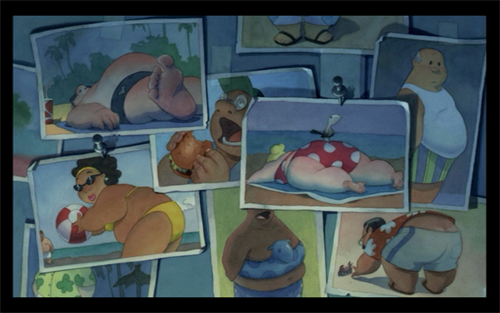
the dropped sub-plot was that lilo hated tourists, which is why she goes around taking pictures of them like they were attractions instead of people; like how they took photos of locals
similarly there was a deleted scene where she scares tourists off of a beach by sounding a false tsunami siren to watch them run screaming
deeper in the lore that kid thats a prick to her, mertyle, is the daughter of the person who runs the megamart and crushed a lot of other local businesses- when they have to do a hula to tell a story mertyle actually uses it to describe the low prices, where lilo does a hula about a traditional creation myth that was important to her mother. you may notice both lilo and nani are on first name basis with both the coffee shop owner and the fruitseller, there is big disparity between the locals and foreign interest businesses relegating them to just be tourist industry
friendly reminder that lilo & stitch is indisputably the best disney film
WATCH: Rare corpse flower blooming at Tucson Botanical Gardens
TUCSON, AZ – For the first time in its history, Tucson Botanical Gardens has a blooming corpse flower.
The corpse flower, which gets its name from the “rotting flesh” odor it emits, is extremely rare and unpredictable.
“Corpse
flowers are considered rare in the world of botanic gardens,”
said Michelle Conklin, executive director of TBG. “There have been about
100 recorded cultivated corpse flowers around the world. The first
recorded flowering in the United States was at the New York Botanical
Gardens in 1937.”
The plants can take up to a decade to bloom for the first time and the bloom only lasts for 24-48 hours.
i’m not against vaping, but man, vaping two inches from my face on the subway is a ridiculous asshole kind of move. this dude was billowing like he was auditioning for the role of haunted house fog machine. the humidity in the whole car changed, he was ruining haircuts. just jump starting the water cycle. condensation was dripping down my glasses. people were slipping off poles, it was chaos. it was like watching one man try to terraform the moon. a planet with one dense, root beer scented atmosphere blocking out the sun and choking all life.
The other day I came across this awesome program by accident
(I don’t even remember what I was actually searching for, but on the several
times I’ve looked for a program like this I’ve had no luck). It’s cool enough that I wanted to share it.
It’s called DesignDoll (website here) and it’s a program that lets you shape and pose a human figure pretty much however you want.
There’s a trial version with no expiration date that can be
downloaded for free, as well as the “pro license” version priced at $79.
I’ve only had the free version for two days so far, so I’m not an expert and I
haven’t figured out all of the features yet, but I’ve got the basics down. The
website’s tutorials are actually pretty helpful for the basics, as well.
Here’s the page for download, which has a list of the
features available in both versions.
There are three features the free version doesn’t have:
Can’t save OBJ files for export
Can’t download models and poses from Doll
Atelier (a sharing site for users; note that the site is in Japanese, though)
It can’t load saved files
The third one means that if you make a pose, save it, and
close the program, you can’t load that
pose/modified model later. You have to start with the default model. I
found that out when I tried to load a file from the day before (this is why
reading is important…). Whether saving your modifications (and downloading models and poses) is worth $80 is up to you.
But, the default
model is pretty nice and honestly if all you’re looking for is a basic pose reference
it should work fairly well as it is. Here’s what it looks like:
There’s a pose tag
that lets you drag each joint into place and rotate body parts. The torso and
waist can be twisted separately, and it seems like everything pretty much
follows the range of movement it would have on an actual human.
Even the entire shoulder area is actually movable along with the joint! See, like how the scapular area of the back raises with the arm:
The morphing tag
is one of the coolest features, in my opinion. It lets you pick and choose from
a library of pre-set forms for the head, chest, arms, legs, etc. It has some more realistic body shapes in addition to more anime-like ones. Don’t like the
options there? Mix a few to get what you want! Each option has a slider that
lets you blend as much or as little as you want into the design.
So you, too, can create beautiful things like kawaii
Muscle-chan!!
The scale tag
lets you mess with the proportions and connection points of different joints. This
feature combined with the morphing feature not only allows more body shape
variations, but it also means that you can do things like make a more digitigrade
model if you want. (The feet only have an ankle joint, but for regular human poses that’s all that you really need, so whatever.)
Or you can make a weird chubby alien-like thing with giant
hands and balloon tiddies if that’s more your thing.
The ability to pose
hands to the extent it allows is far more than I could have hoped for from
a free program. Seriously, you can change the position of each finger joint individually, as well as how spread out the fingers are from each other. Each crease on the diagram below is a point of movement, and the circles are for spread between fingers.
And to make it a bit more convenient, there’s a library of pre-set hand poses you can pick from as well, and then change the pose from that if you like.
In both versions, you can also import OBJ files from other places for the model to hold, like if you wanted to have them hold a sword or something.
Basically, this program is awesome and free and you should
totally check it out if you want a good program for creating pose references.
I just wanted to add a little more to this. If you have trouble figuring out how light sources work in your drawings this also allows you to choose where to have a light source.
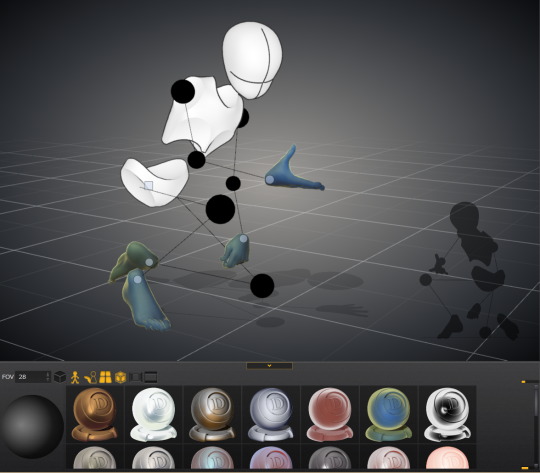
That shaded ball on the left is your light source. You can see how moving the point changed the shadow cast.
Oh and all those other nifty looking things in that bottom bar there, yeah it’s what you think. You can change the model color to one of these presets or even customize your own palette.
Plus for all you lovely people who want something a little more simplified to use as a pose reference
You can turn your model into the classic wire frame.
Why reblog this? Because for more visual creators, this will be like the lumberjack discovering chainsaws. “Reblog to save lives” as the saying goes.



 Marshmellowmilktea