For the sake of moving your stuff to other places.
First, consider backing up your blog. They’ll send you a back up of every single post on your blog in a file via email, though it takes some time and be a really big file for some. You might not need or want it, depending on your blogging style.
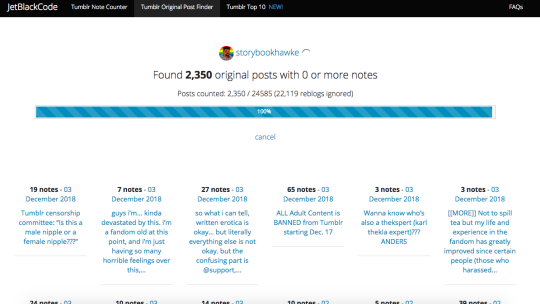
Tumblr Original Post Finder (jetblackcode.com/TumblrOriginalPostFinder/) ((not linked for obvious reasons for tblr’s censoring))
It will look like this when you type in your URL and press enter.
You can then go through and see which ones you’d want to save, or you can go back and filter by number of notes (for example, it can find all posts with 10+ or 100+ notes or whatever you desire). I plan on saving them to a document in order to post later to alternative websites, wherever we end up moving.
There’s not a lot of ways to speed the process up, but this is what I have. I hope it helps.

 Marshmellowmilktea